3.4.6.5. Edit raster
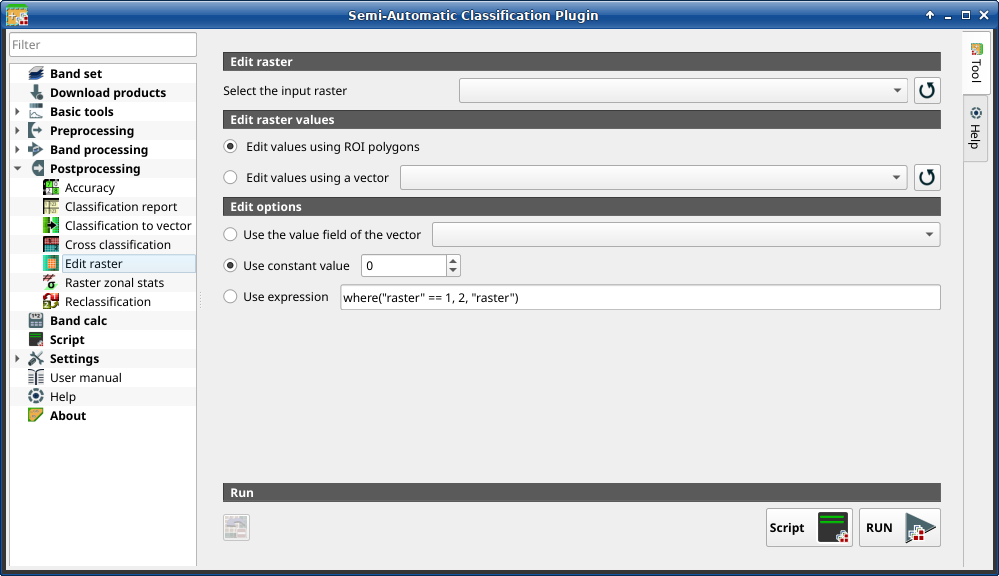
Edit raster
This tab allows for the direct editing of pixel values in a raster. Only pixels beneath ROI polygons or vector polygons are edited.
Warning
The input raster is directly edited; it is recommended to create a backup copy of the input raster before using this tool in order to prevent data loss.
This tool can rapidly edit large rasters, especially when editing polygons are small, because pixel values are edited directly.
Tip
Information about APIs of this tool in Remotior Sensus at this link .
3.4.6.5.1. Edit raster
Tool symbol and name |
Description |
|---|---|
Select the classification |
select a raster (already loaded in QGIS) |
|
refresh layer list |


3.4.6.5.2. Edit raster values
Tool symbol and name |
Description |
|---|---|
|
if checked, raster is edited using temporary ROI polygons in the map |
|
if checked, raster is edited using all the polygons of selected vector |
|
refresh layer list |

3.4.6.5.3. Edit options
Tool symbol and name |
Description |
|---|---|
|
if checked, raster is edited using the selected vector in Edit values using a vector) and the polygon values of selected vector field |
|
if checked, raster is edited using the selected constant value |
|
if checked, raster is edited according to the entered expression;
the expression must contain one or more accepted variables
are: this expression only edit pixels that are beneath the input vector polygons |


3.4.6.5.4. Edit raster values
Tool symbol and name |
Description |
|---|---|
|
undo last edit of raster |
Script |
add this function to the Script |
RUN |
run this function |


